
Database Architecture: OLTP vs OLAP Separation
Learn why separating transactional and analytical databases is an industry standard practice for scalable applications.
Why Separate OLTP and OLAP?
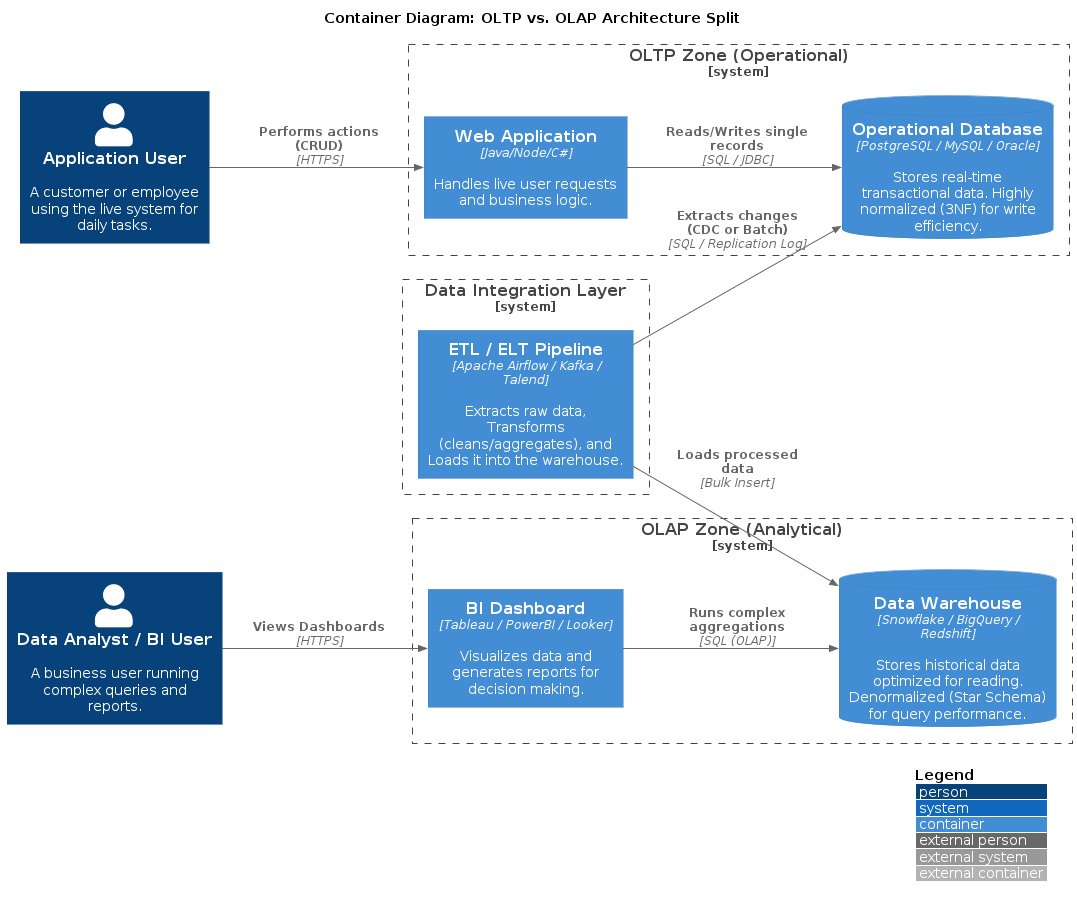
The reason this architecture is considered "Industry Standard" is that you are physically separating two fundamentally different workloads:
- OLTP (Online Transaction Processing): Your operational database that powers the application. You don't want a heavy analytical report slowing down a user trying to log in or complete a purchase.
- OLAP (Online Analytical Processing): Your analytical database where you move data so customers and analysts can run complex, resource-intensive queries without impacting application performance.
Real-World Analogy: A Restaurant
OLTP is the Kitchen
- Orders come in fast and need immediate processing
- Chefs focus on one ticket at a time
- Goal: Get food out quickly and keep customers happy
- If you stop the chef to ask, "How many carrots have we chopped in the last 5 years?", the kitchen grinds to a halt and customers get angry
OLAP is the Accountant's Office
- Takes all the receipts from yesterday (or last month)
- Sits quietly and calculates totals, averages, trends, and insights
- Goal: Understand business health and make strategic decisions
- It doesn't matter if analysis takes an hour; it doesn't stop the kitchen from cooking
OLTP (Online Transaction Processing)
"The Shop Floor"
This is the database that runs your actual application. It's designed to handle thousands of tiny, fast changes happening constantly.
Characteristics
- Primary Goal: Speed and reliability for day-to-day operations
- Typical Operations:
INSERT,UPDATE,DELETE, simpleSELECT - Example: A user logs in, adds an item to a cart, or updates their profile picture
- Performance:
- Reads and writes must happen in milliseconds
- Queries usually touch only one record at a time (e.g., "Find user with ID 123")
- High concurrency: Thousands of users can perform operations simultaneously
- Common Technologies: MongoDB, PostgreSQL (for apps), MySQL, Oracle, SQL Server
Use Cases
- User authentication and session management
- E-commerce transactions and order processing
- Real-time inventory updates
- Social media posts and interactions
- Banking transactions
OLAP (Online Analytical Processing)
"The War Room"
This is the database used for reporting and data analysis. It's designed to answer complex questions about huge amounts of historical data.
Characteristics
- Primary Goal: Analyzing trends and aggregating massive datasets
- Typical Operations:
SELECT,SUM,COUNT,AVG,GROUP BY, complexJOINs - Example: "What was the average revenue per user across all regions for the last 3 years?"
- Performance:
- Queries might take seconds or minutes because they're crunching millions of rows
- Queries scan entire tables or columns
- Low concurrency: Only a few analysts or managers running reports at once
- Common Technologies: Snowflake, Google BigQuery, Amazon Redshift, Databricks, PostgreSQL (when tuned for warehousing)
Use Cases
- Business intelligence dashboards
- Historical trend analysis
- Customer behavior analytics
- Financial reporting and forecasting
- Machine learning feature engineering
Cloud data warehouses are cost-effective for sporadic, heavy workloads on massive datasets. However, for continuous, lightweight usage or smaller datasets, a fixed-price PostgreSQL instance is often cheaper and more predictable.
Why This Separation Matters
1. Performance Isolation
Heavy analytical queries won't slow down your application. Users can continue shopping, posting, or transacting while analysts run complex reports.
2. Optimized for Different Workloads
- OLTP databases are optimized for row-based operations (individual records)
- OLAP databases are optimized for column-based operations (aggregations across many records)
3. Data Transformation
The ETL/ELT process allows you to:
- Clean and normalize data
- Denormalize for faster analytical queries
- Aggregate pre-computed metrics
- Join data from multiple sources
4. Cost Efficiency
- OLTP: Pay for fast, always-on performance
- OLAP: Pay for storage and compute only when running queries (especially with cloud data warehouses)
5. Security and Compliance
Separate databases allow you to:
- Control who has access to sensitive operational data
- Provide analysts with anonymized or aggregated data
- Implement different backup and retention policies
Common Architecture Pattern
┌─────────────┐
│   App Users │
└──────┬──────┘
       │
       ▼
┌─────────────────┐
│  OLTP Database  │  ◄── Fast, transactional
│   (MongoDB)     │
└────────┬────────┘
         │
         │ ETL/ELT Pipeline
         │ (Scheduled sync)
         ▼
┌─────────────────┐
│  OLAP Database  │  ◄── Slow, analytical
│  (PostgreSQL)   │
└────────┬────────┘
         │
         ▼
┌─────────────────┐
│  BI Tools &     │
│  Analysts       │
└─────────────────┘
The ETL pipeline is often the bottleneck. Start with simple nightly batch jobs using cron + database dumps. Only move to real-time CDC (Change Data Capture) tools like Debezium or Airbyte when you have a proven need for fresh data. Real-time sync adds significant operational complexity.
Implementation Considerations
Data Synchronization
- Batch ETL: Nightly or hourly data dumps (simpler, cheaper)
- Real-time CDC: Change Data Capture for near-instant sync (complex, expensive)
- Hybrid: Critical data in real-time, historical data in batches
Schema Design
- OLTP: Normalized schemas (3NF) to reduce redundancy
- OLAP: Denormalized schemas (star/snowflake) for query performance
When to Separate
You should consider OLTP/OLAP separation when:
- Analytical queries are slowing down your application
- You need to run reports on historical data (months or years)
- Multiple teams need different views of the same data
- You're scaling beyond a single database instance
Start simple with a single database. Only introduce OLAP separation when you experience actual performance issues or have clear analytical requirements. Premature optimization adds complexity without benefit.